Non residents information

Non Residents


Welcome!

This section brings together all the useful information for NIC Argentina's Non-Resident users — that is, people who manage their .ar domains with a user ID issued by NIC because they don't live in our country and don't have a CUIT (Unique Tax Identification Code) and/or CUIL (Unique Labor Identification Code) number.

If you'd like to get your ID and password to register .ar domains, you'll find all the information on how to validate your identity below.

Here you'll find:

What steps to follow What documentation you'll need How to log into the platform How to edit your billing information FAQs


What steps do I have to follow?


To validate your identity, you need to follow these 6 steps:


1 Download this note, fill it out, and sign it — depending on whether you want to validate yourself as a Natural Person or a Legal Entity.
2 Have your signature on the note certified by a competent authority in the place of issuance. This can be a Notary Public or similar official.
3 Gather the documentation according to your case:
Natural Person

In addition to the note and signature certification, you'll need:

  • A certified copy of your ID/Passport.


Legal Entity

In addition to the note and signature certification, you'll need:

  • A certified copy of the signer's ID/Passport.
  • A Power of Attorney supporting the signer's position or legal capacity.*
  • A notarial sheet certifying the signer's legal capacity.

**If the person signing the note is a representative of your organization in Argentina and the Power of Attorney supporting their role was issued in a jurisdiction other than the City of Buenos Aires (CABA), you must also include the legalization from the corresponding Notarial Association (Colegio de Escribanos). If it was issued in the CABA jurisdiction, the legalization is not required.


5 Everything must be legalized or apostilled in the country of origin
4 If the documentation is in another language (not Spanish), you must have it translated by a certified public translator.
6 Send the scanned documents by email to noresidentes@nic.ar

What documentation do I need to submit?


Based on the steps in the previous section, here are some examples to use as a guide.


Documentation to be submitted by a Natural Person:

A

Natural person's Note — completed and signed.

B

Signature certification.

C

Copy of ID or Passport.

D

Authentication of the ID/Passport copy.

E

Legalization or apostille in the country of origin, as applicable.

F

Translation of all documentation, if required.


Documentation to be submitted by a Legal Entity:

A

Legal Entity Note — completed and signed.

B

Signature certification.

C

Copy of ID or Passport.

D

Authentication of the ID/Passport copy.

E

Power of Attorney certifying that the person signing the note is the legal representative of the Legal Entity.

F

Notarial sheet certifying the person invoked.

G

Legalization or apostille in the country of origin, as applicable.

H

Translation of all documentation, if required.


How do I log into the platform?

Once we verify all the documentation you sent by email, we'll reply with your ID and password so you can access the platform. After that, follow the steps to edit your information.

You're all set! You can now register and manage your .ar domains.

Log into the platform with your ID and password here:

Log in →


How do I edit my billing information?


Every time you carry out a domain transaction, you must edit your billing information so we can issue the invoice.

To do this, follow these steps:


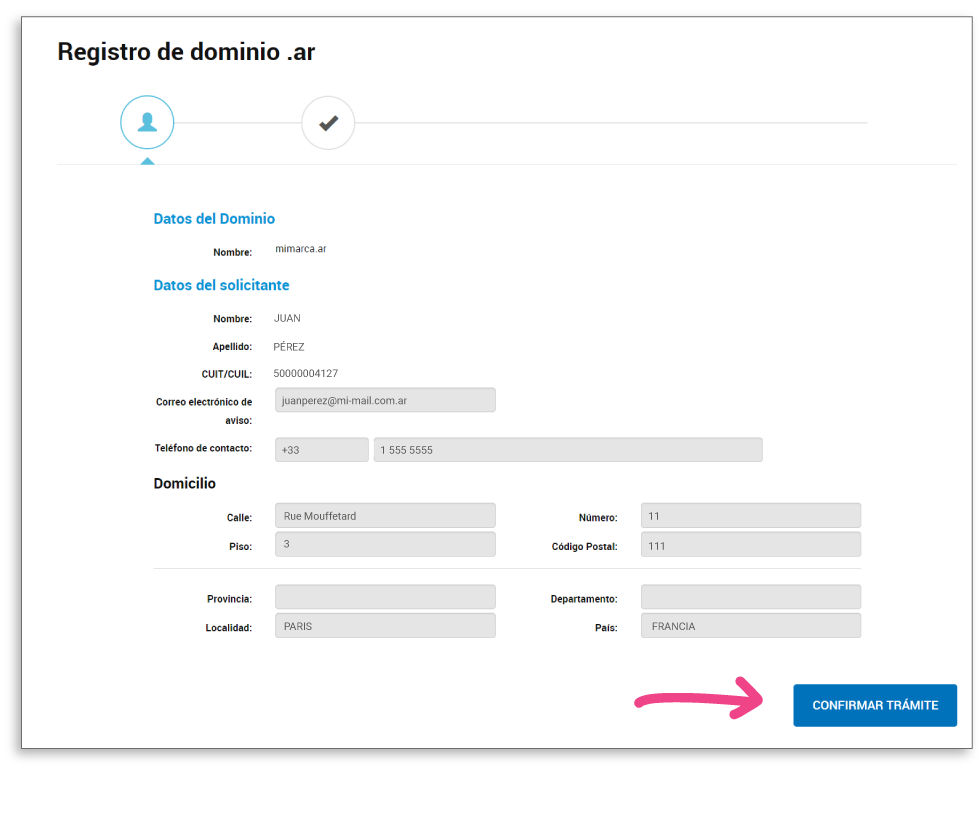
Step 1

1- Once you've started your domain transaction, click on Confirm Transaction.


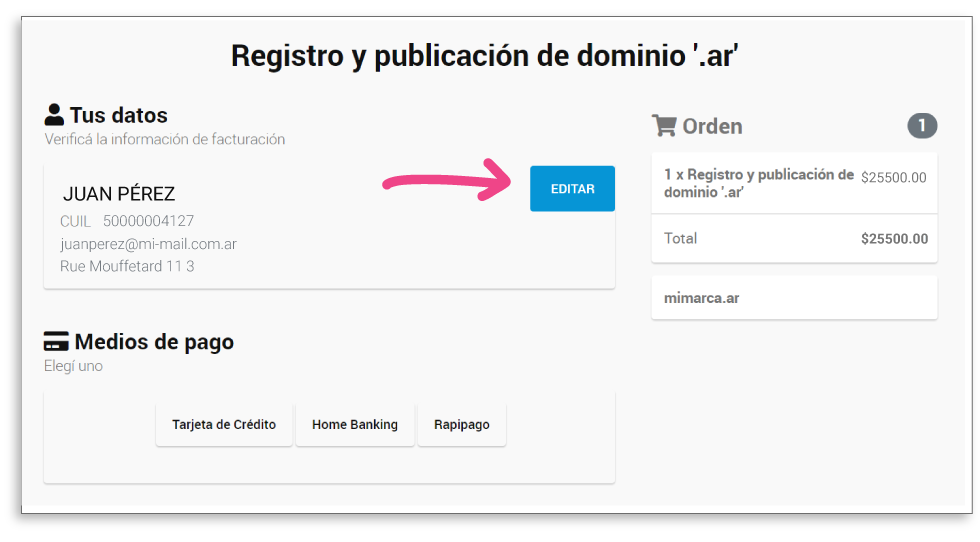
Step 2

2- Next, click the Edit button to update your billing information.

Editar
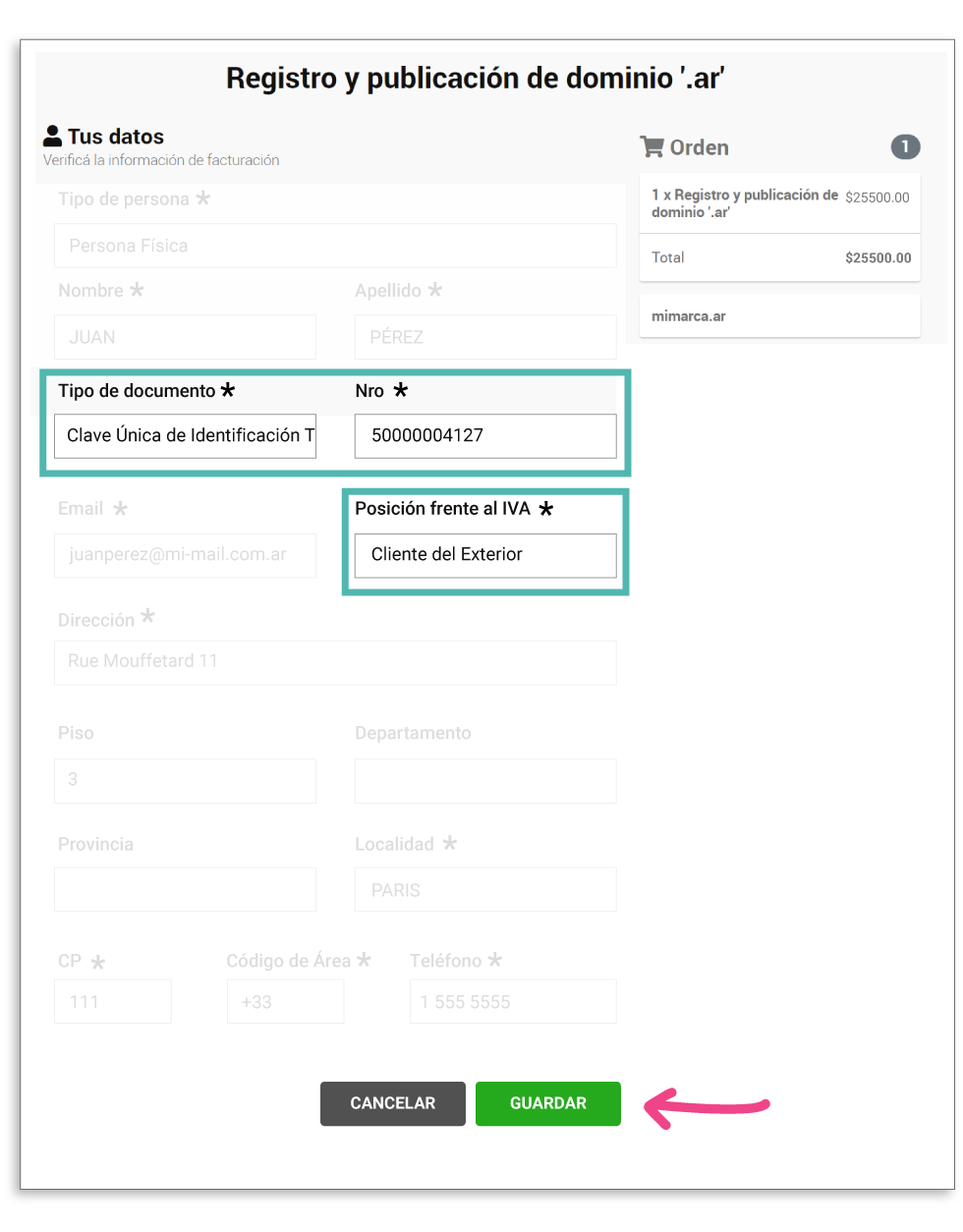
Step 3

3- In the Document Type field, select Unique Tax Identification Code, and in No., enter the CUIT corresponding to your country of residence. You can look it up in the following [ARCA list]. In VAT Status, select Foreign Customer, and then click Save.


guardar

You're all set! Your billing information has been updated. Now go ahead and pay your transaction to complete it.

For guidance on other transactions, you can visit our tutorials.


FAQs: Non-Residents


1- Non-Resident User

A Non-Resident User is anyone who does not reside in Argentina and does not have a CUIT/CUIL number or a Tax Code (Clave Fiscal).

2- What transactions can I carry out?

You can carry out Registration, Renewal, Transfer, Dispute, and Domain Delegation transactions.

You can also request the Special Zones Authorization for registering domains ('.int.ar' and '.org.ar'), submit a Request for a Report on an Internet Domain, and, when applicable, file a Dispute Response.

3- How do I carry out domain transactions if I don't have a CUIT/CUIL number?

If you don't reside in Argentina and don't have a CUIT/CUIL number and/or a Tax Code Level 2 or higher, you'll need to validate your information through the digital form in order to operate as a Non-Resident User.

4- I started the Non-Resident User Validation request. What's next?

Once the documentation has been submitted through the digital form, it will be reviewed by NIC Argentina. If everything is in order, you'll receive your ID and password by email so you can begin operating on the platform.

5- What is the ID?

It's a personal identification number assigned to each Non-Resident User to operate on the new platform.

  • Non-Resident Natural Persons: 40/41-XXXXXXXX-X
  • Non-Resident Legal Entities: 50/51-XXXXXXXX-X
6- How do I complete procedures in Trámites a Distancia (Online Procedures)?

To carry out domain transactions, log in through the Non-Resident User Login with your ID and password.

7- What happens if I forget my password?

Go to Forgot my password. There, enter your email address and your ID. You'll then receive an email with your new password.

8- Someone wants to transfer a domain to me. How do I accept it?

To accept the Transfer, log into Trámites a Distancia and select My Transactions from the main menu. Then, from Pending Tasks, choose the Accept Transfer option. For more details, check the tutorial.

9- Where can I see my domains?

Log in through the Non-Resident User Login. Inside, under Agency, select NIC Argentina. On NICar - Registrations, Renewals and Other Operations, click Start Transaction, where you'll find a Domain List from which you can manage them.

10- Can I edit my billing information?

Yes, when paying for a transaction, you must edit your billing information. To do this, we suggest following this tutorial.